
842浏览
36喜欢
14复制
图像格式
生成提示词
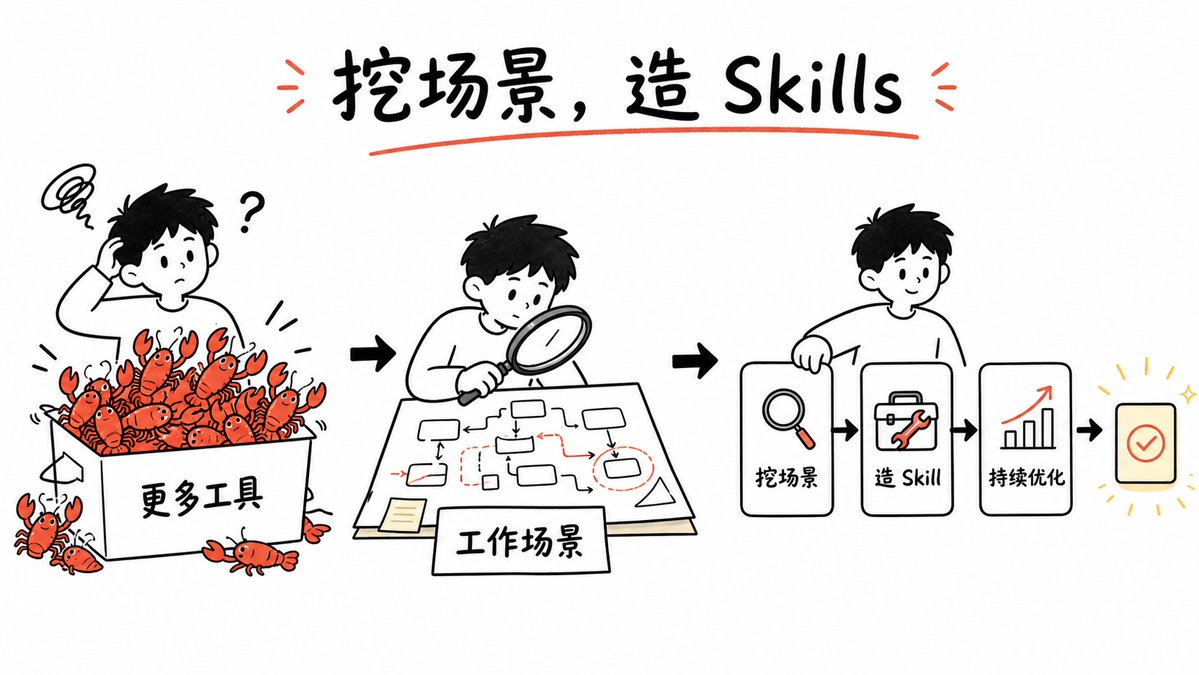
Goal: Create a clean whiteboard hand-drawn explainer illustration about turning messy tool overload into reusable GPT image skills. Use a playful black marker sketch style with selective red-orange accents and a few yellow highlights. Canvas: Wide 16:9 horizontal canvas, white background, generous margins, centered composition. Hand-drawn black outlines, slightly imperfect marker strokes, minimal shading, no photorealism. Title: At the top center, write the large handwritten headline {argument name="headline text" default="挖场景,造 Skills"}. Use bold black brush lettering, underline it with one red-orange curved stroke, and add two small red-orange emphasis marks on each side of the title. Layout: Arrange the story as a left-to-right workflow with three main illustrated scenes connected by bold black arrows. Scene 1 on the left shows confusion and too many tools; scene 2 in the center shows analyzing the work scenario; scene 3 on the right shows a simplified skill-building pipeline. Scene 1: Draw a confused young person with short black hair scratching their head, a question mark beside them, and a scribbly frustration cloud above. They stand behind a large open box labeled {argument name="tool box label" default="更多工具"}. The box is overflowing with exactly 18 small red-orange cartoon crawfish/lobsters as a metaphor for too many tools: 15 visible inside or on the rim of the box and 3 outside near the bottom/left edges. Each crawfish has simple black eyes, claws, and segmented bodies. Add small motion lines around the box. Scene 2: Draw the same young person leaning over a table with a magnifying glass, studying a paper workflow map. The paper contains a hand-drawn process diagram with exactly 10 small rounded rectangles/nodes, thin black connector arrows, and a few red dashed boxes and red arrows marking important points. Add a small sticky note on the lower left of the paper. In front of the table, place a rectangular label card reading {argument name="scenario label" default="工作场景"}. Scene 3: Draw the same young person smiling and holding or leaning on the first card of a pipeline. The pipeline contains exactly 4 visible cards/icons arranged horizontally: card 1 with a magnifying glass icon and label {argument name="step one label" default="挖场景"}; card 2 with a toolbox/wrench icon and label {argument name="step two label" default="造 Skill"}; card 3 with an upward bar chart and red rising arrow icon labeled {argument name="step three label" default="持续优化"}; card 4 is a small rounded square success card with a red-orange checkmark, surrounded by short yellow radiating lines and sparkle marks. Connect the cards with bold black arrows. Visual style: Simple black-and-white whiteboard illustration, friendly Notion-like doodle proportions, rounded characters, thick marker outlines, sparse red-orange accent color on crawfish, arrows, tools, underlines, and chart arrow. Keep the background empty and uncluttered. Constraints: Preserve the left-to-right narrative and the exact counts of the three main scenes, 18 crawfish/lobsters, 10 workflow nodes, and 4 pipeline cards. Do not add extra panels, logos, watermarks, or dense explanatory text.
AutoAGC workflow
转化为可复用工作流
- 复制提示词正文,保留角色、任务、模型、风格和输出约束。
- 在 GPT Image 2 或同类模型中粘贴,并上传参考材料或工作流 brief。
- 根据输出格式、品牌语气、多语言版本和执行目标替换最后一段限定条件。
Asset
资源预览
- 素材类型
- 图像
- 模型
- GPT Image 2
- 场景
- 信息图 / 教育视觉图
More prompts
GPT Image 2 更多系统提示词
Browse workflows